Guide
Self-host zvena: open-source notes, tasks and design
zvena is open source, so the workspace you see on zvena.app can run on your own machine: Docs, Projects, Calendar and Mail, and the Design editor if you want it. This page says what you need at each level, what we checked ourselves, and what becomes your job.
Updated
What you are running
The zvena repository on GitHub holds the product: the web app (Docs, Projects, Calendar, Mail, workspaces and roles), zvena Design (a fork of Penpot) and the Docker files to run them. The web app is licensed under the GNU AGPL 3.0 and Design under the MPL 2.0. It does not include zvena.app's website or the settings of the hosted service, so there is no Google or GitHub sign-in in it: people sign in with a one-time email link or with single sign-on (SAML or OpenID Connect).
There is no ad code and no third-party analytics in it, and the visitor's browser loads data only from your own domains. The one optional AI, a decision model behind smart suggestions, is off until you give the server an endpoint and a key for it (the deployment guide lists the settings); without them, nothing is sent anywhere.
Three ways to run it
1. Try it on your computer
Node.js 24 and Git. Docs, Projects, Calendar and Mail, no Design editor. A test sign-in and no database server. Installing takes a few minutes.
2. Everything on one machine
Linux (or WSL 2) with Docker. Design included. For you or a small trial, on localhost. The first build can take 30 to 60 minutes.
3. A real server
Ubuntu, Docker Compose, a domain, HTTPS and an SMTP server for sign-in emails. For other people. You publish your own legal pages.
Try it on your computer
You need Node.js 24 or newer and Git. These are the steps from the repository's README:
git clone https://github.com/Zvena-app/zvena-oss.git && cd zvena-oss/web
npm ci
cat > .env.local <<EOF
AUTH_SECRET=$(node -p "require('crypto').randomBytes(32).toString('hex')")
ZVENA_STAND=test
ZVENA_DEV_LOGIN=1
ZVENA_DB_PATH=./data/zvena.db
ZVENA_FILES_DIR=./data/files
EOF
npm run dev
Open http://localhost:3100, choose Sign in as a test user and type any name. Your data stays in web/data/; delete the folder to start over.
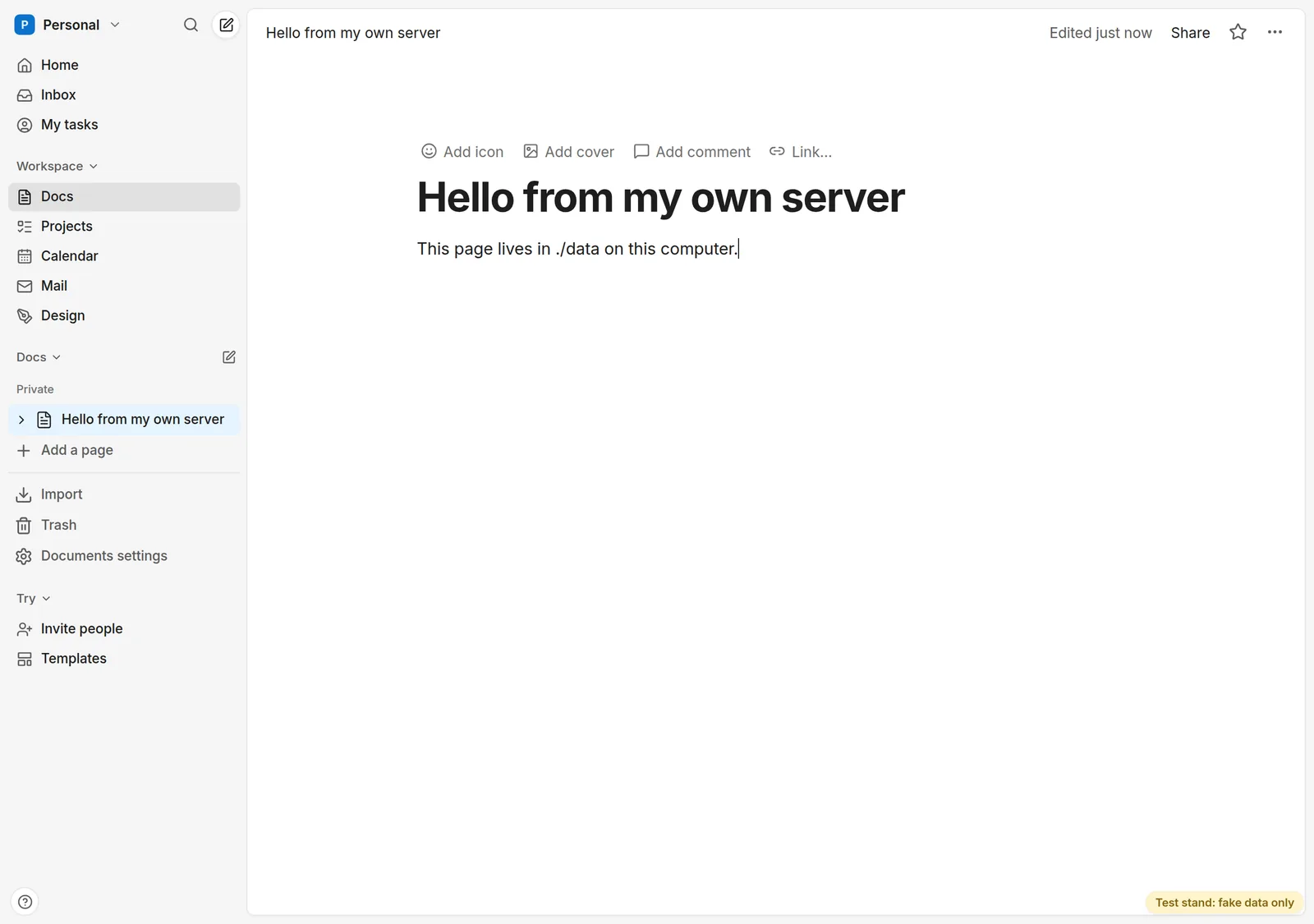
What we checked. On October 16, 2026 we followed these steps from a fresh clone of release v1.0.1: npm ci took 26 seconds, the server started, and the project's own browser smoke test (sign-in, a page that survives a reload, the same page in a second browser) passed 11 of 11. One thing we hit: if you open it on a port other than 3100, add APP_URL=http://localhost:<port> to .env.local, or sign-in sends you back to port 3100.
The settings ZVENA_STAND=test and ZVENA_DEV_LOGIN=1 mark this as a test server: a banner on every page, nothing indexed by search engines, and a sign-in that needs no account. Never set them on a server other people use.
The whole thing on one machine
To get Design as well, run everything with Docker. You need Linux (or WSL 2, x86-64), Docker, Git and OpenSSL:
git clone --branch v1.0.1 https://github.com/Zvena-app/zvena-oss.git && cd zvena-oss
sudo deploy/scripts/local.sh
Use the newest release tag from the releases page in place of v1.0.1 if there is one. The script writes a settings file with fresh secrets, gets the three images and starts them on localhost:3100 (Design on 3110). When a release's prebuilt images can be downloaded it does; otherwise it builds them from the checkout, which the first time needs about 8 GB of memory, 15 GB of disk and 30 to 60 minutes. Everything listens on 127.0.0.1 only, and emails are kept as files instead of being sent. Details, other ports and how to stop it are in the README.
A real server for other people
The deployment guide walks through it. In short, you need:
- A server: Ubuntu 24.04 or 22.04 LTS with 4 vCPU, 8 GB of RAM and an 80 GB SSD. Building Design on the server needs about 15 GB more disk and 8 GB of free memory, or you build the images elsewhere.
- A domain with three names pointing at the server: the main one,
wwwanddesign. Caddy gets and renews the HTTPS certificates by itself. - An SMTP server for the sign-in links and invitations, or single sign-on.
- Your legal pages. zvena ships no Terms of Service or Privacy Policy of its own: publish yours and point
ZVENA_TERMS_URLandZVENA_PRIVACY_URLat them. - Backups and updates. The repository includes scripts for backups, restores and updates; running them on a schedule is yours.
We have not repeated a full server install for this page; the steps are the repository's. If you follow them and something is wrong or unclear, please open an issue.
License, in plain words
This is a summary, not legal advice; the repository's LICENSING file is the reference.
- You may use, study, change and run zvena for yourself or your team, free of charge.
- If you let other people use a modified version over a network, the AGPL asks you to offer them that version's source. Publish it and set
ZVENA_SOURCE_URL; the/sourcepage of your server then links to it. - Design is under the MPL 2.0, as Penpot is: changes to its own files stay open.
- The zvena name and logo are not covered by these licenses; see TRADEMARKS in the repository.
zvena.app runs this code plus what belongs to the hosted service: its website, its sign-in with Google and GitHub and its email provider. Our source page lists what is and is not in the repository.
Using it for an open-source project
If you run an open-source project, zvena can hold its working notes: Docs pages for design notes and plans, and a decision log linked to tasks. A page can be published read-only with a link from Share → Publish (search engines skip it unless you allow indexing), and contributors join a workspace by invite link with a role of editor, commenter or viewer. Projects is for your workspace's members; it is not a public issue tracker, so if your community reports bugs on GitHub, keep doing that there.
What becomes your job
- Updates and security patches, backups and monitoring. There is no managed service and no support contract; help is the issue tracker.
- The cost of Design. The editor is a Penpot fork with its own database, cache and exporter. It is the heavy part of the stack; the web app alone needs far less.
- Email. Without an SMTP server nobody can use the email sign-in on a real server.
- Moderation and legal duties for the people you host: reports, terms, privacy. The deployment guide opens with a checklist for them.
- The apps. The repository also holds a browser extension and desktop and mobile apps. They are not covered here and need building.
Questions
Is the hosted zvena.app free?
Yes: no per-seat pricing and no trial; see pricing. Self-hosting is for people who want their own server or their own rules, not a way to avoid a bill.
Do I need Design?
Not to try it: the Node.js route above runs without Design, and its links just stay off. The Docker stack includes Design, the design editor with live frames inside pages.
Where does my data go?
Pages, issues and files stay on your server. The server talks to your SMTP server, to Let's Encrypt for certificates, to your model provider if you configure one, to Figma only when someone imports a Figma file with their own token, and to Google Fonts for Design's font catalog, which it caches.
Can I move my Notion pages in?
Yes, with the same importer as on zvena.app: how to migrate from Notion.
Where to go next
Free for everyone. No credit card, no trial, no ads.