Guide
Keep a project decision log linked to its tasks
Six months from now someone will ask why the team shipped the mobile beta before the redesign. A decision log answers that, as long as each decision is easy to find and the tasks it created point back to it. Here is how to set one up in zvena in a few minutes.
Updated
What a decision log should hold
One entry per decision, short enough that people write it while the discussion is still fresh. Five things are enough:
- The decision in one sentence, written as a statement (“Ship the mobile beta first”), not a topic (“Beta timing”).
- Why: the context and the options you weighed, including the ones you rejected.
- Who and when: the owner and the date.
- Status: proposed, accepted or superseded, so an old decision is never mistaken for the current one.
- What follows: the tasks the decision created. This is the part that usually gets lost, and the reason to keep the log next to the tracker.
Set it up, step by step
The screenshots are real zvena with made-up example data: a team called Northwind deciding to ship a mobile beta first. In zvena the log is a Docs database and the follow-ups are Projects issues.
- Create the database. The quickest start is a CSV with your columns. Save the text below as
Decision log.csv, then in Docs choose Import and pick the file. Dates and the status column are recognized; the other columns arrive as text.
Decision,Status,Owner,Decided on,Area
Ship the mobile beta before the web redesign,Accepted,Maya Chen,2026-10-12,Product
Use TestFlight for the first beta,Accepted,Leo Martins,2026-10-13,Engineering
Keep the free plan at 2 GB per account,Proposed,Priya Patel,2026-10-14,Pricing
Pause the weekly newsletter until launch,Superseded,Sam Rivera,2026-09-30,Marketing
Review beta feedback every Friday,Accepted,Priya Patel,2026-10-14,Product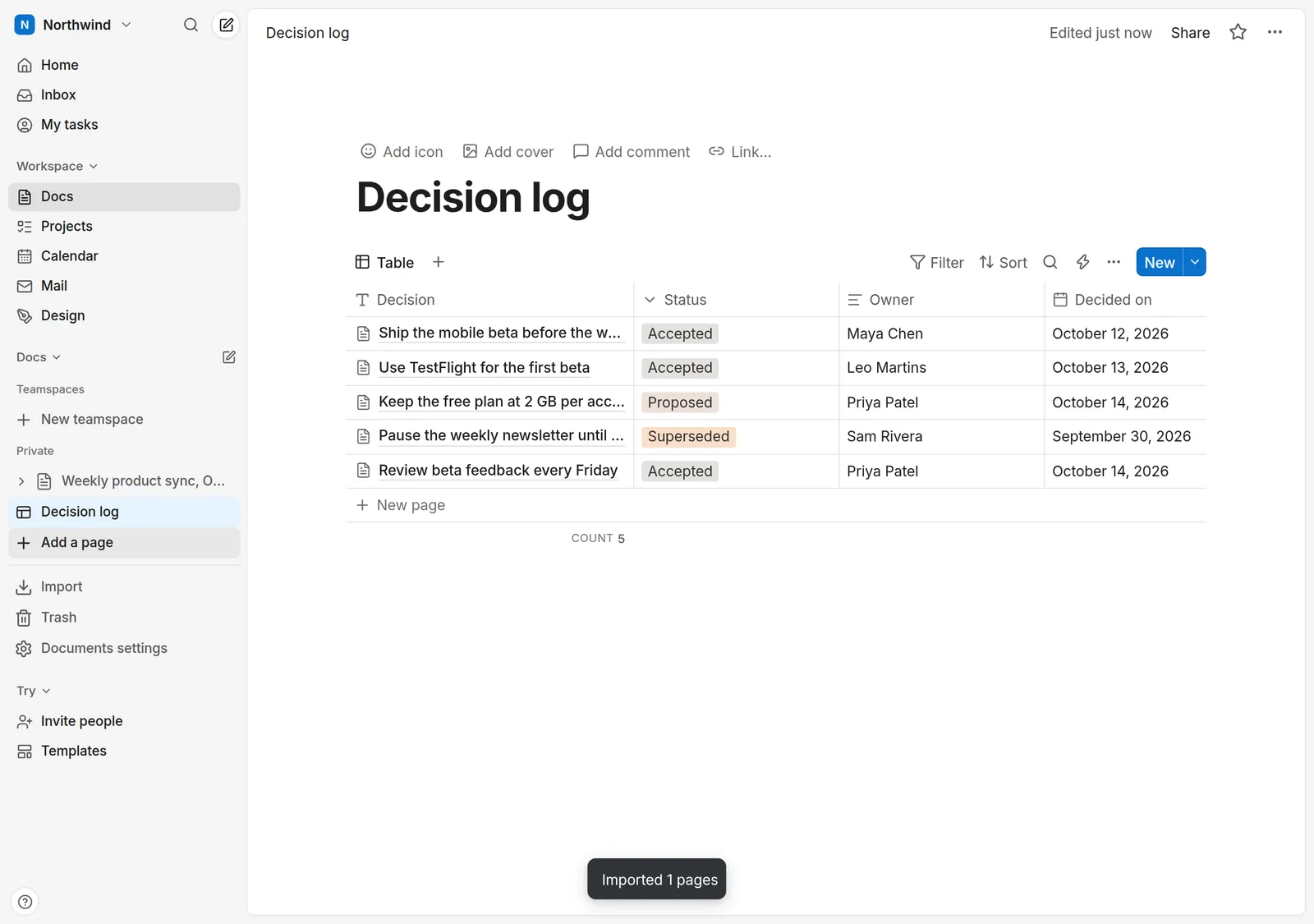
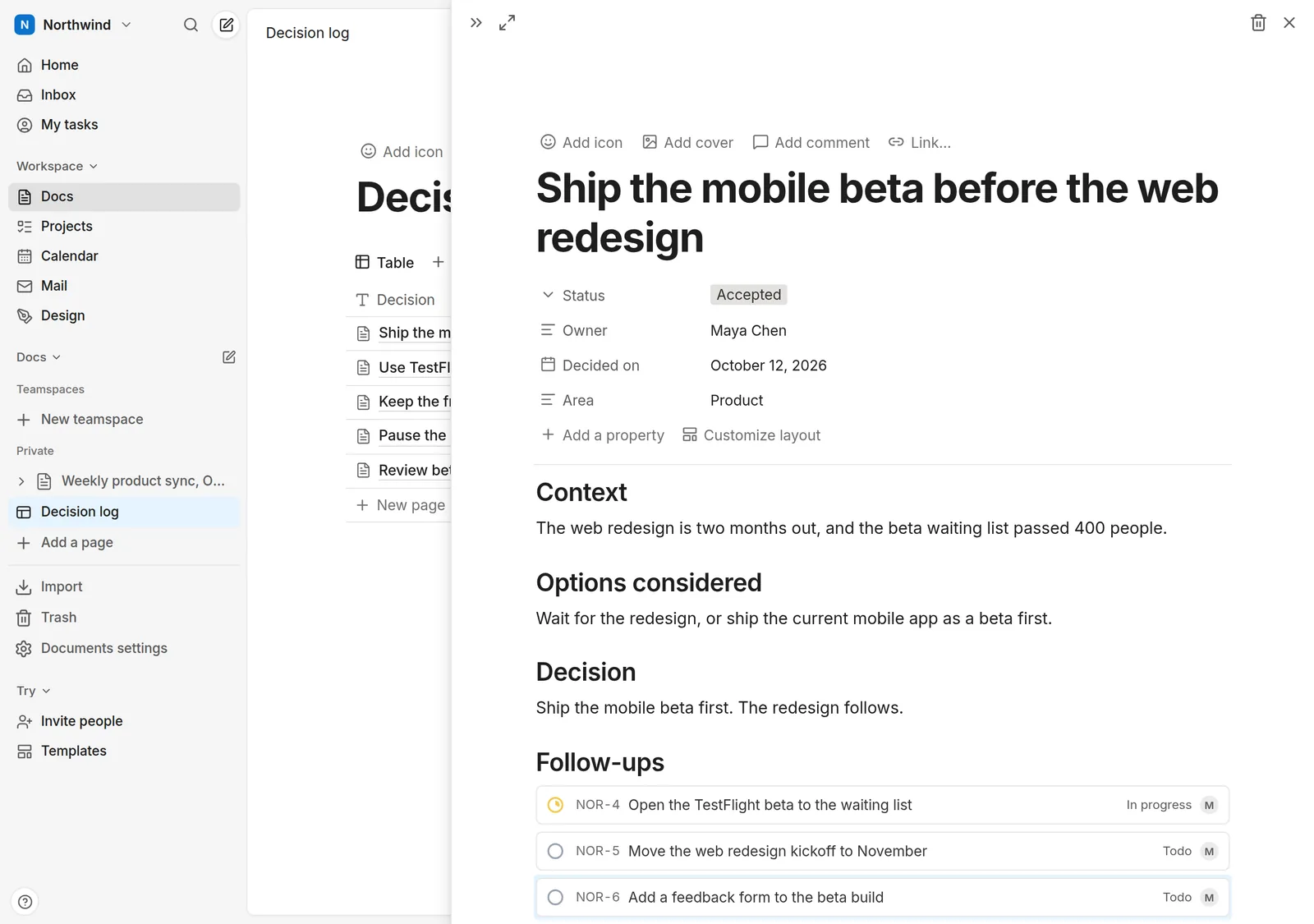
- Write each decision as a page. Open a row and its page opens beside the table, with the properties on top and room to write below. A layout that works: Context, Options considered, Decision, Follow-ups.
- Turn the follow-ups into tasks. Under Follow-ups, type each next step on its own line, select the lines, open the block menu (the ⋮⋮ handle) and choose Turn into issue. Each line becomes a live issue in Projects, and the decision page shows its status as it changes.
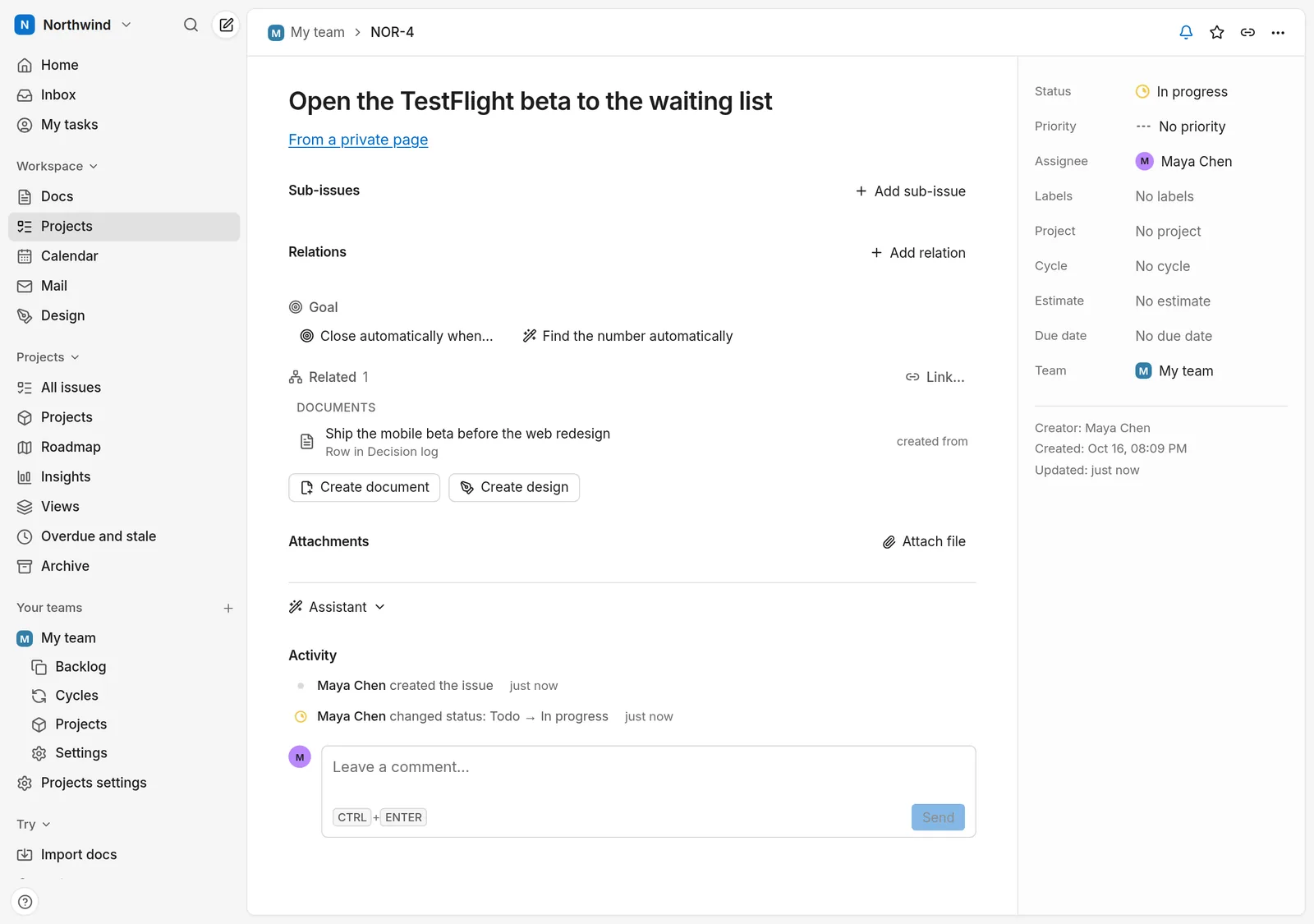
- Find the reason from the task. Open any of those issues, from Projects, My tasks or search. It says which page it came from, and Related lists the decision. Six months later the person holding the task can read why it exists without asking anyone.
- Keep the log current. When a decision is replaced, set the old one to Superseded and write which decision replaced it, with the new decision's date. Filter the table by status or area, or switch the view (Board, Calendar, Timeline and more) when you want a different cut.
Prefer to start from a ready-made file? The Task tracker and Roadmap templates are databases you can reshape into a log, though there is no decision-log template yet.
Habits that keep it useful
- One decision per row. If a page needs the word “and” in its title, it is two decisions.
- Link, don't copy. Refer to the issue or the design instead of pasting its text; the link stays current when the work moves.
- Set the status when it changes, not at the end of the quarter. An outdated “Accepted” is worse than no log.
- Write the options you rejected. They are what people ask about later.
- Share it. A page can be published read-only from Share → Publish; search engines skip it unless you allow indexing. Useful for a project that makes its decisions in the open.
What zvena does not do for you
- There is no special “decision” type. The log is a Docs database, so the fields and statuses above are conventions you set, not rules zvena enforces.
- Tasks need an account. You can try Docs without one, but issues live in Projects, which needs an account and edit rights in the workspace.
- The link is made by you or by Turn into issue. Typing a task into a plain checklist does not link it to anything.
Questions
Is this only for software teams?
No. Any team that makes choices others depend on can use it: a launch plan, a hiring process, a research project. The example is a product team; the method does not depend on it.
How is this different from meeting notes?
Meeting notes record what was said; the log records what was decided and why, one row per decision, so it can be filtered and searched. The two work together: the notes-and-tasks guide shows how action items from a meeting become tasks.
Does turning a follow-up into an issue send my text to an AI?
It becomes an issue like any other. If smart suggestions are on in the workspace, the issue's text can be sent to our model provider to suggest a priority, label or assignee. The privacy policy lists what is sent, and the workspace owner can switch it off.
Can I keep my own copy of the data?
Yes. Every page exports to Markdown, HTML, PDF or CSV, and Settings has Download all my data. zvena is also open source and can be run on your own server.
Where to go next
Free for everyone. No credit card, no trial, no ads.